
Hello from Fordeer,
You can customize your refund ID format by changing the prefix or adding a suffix.
Here is how you can change the Refund ID format.
- Go to Settings on our app, then select Invoice settings, here you can see Refund ID Format
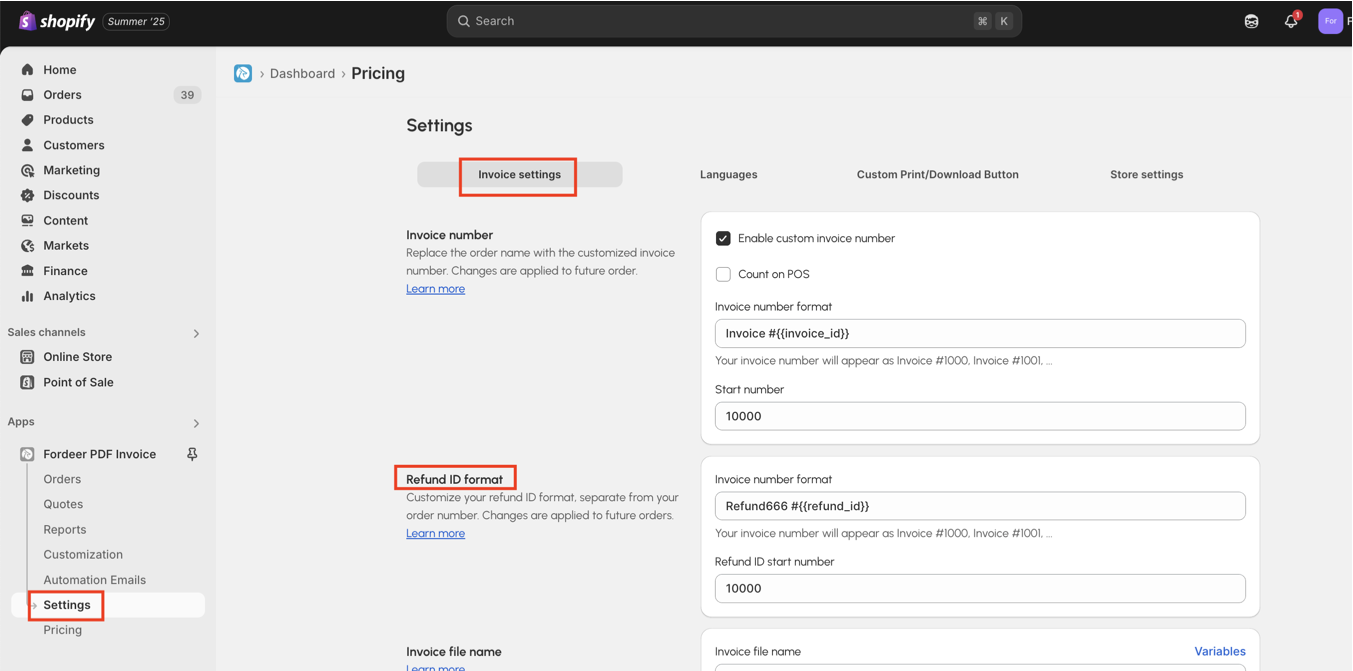
- Here you can change two options to meet your demands and ensure legal compliance including Invoice number format and Refund ID start number
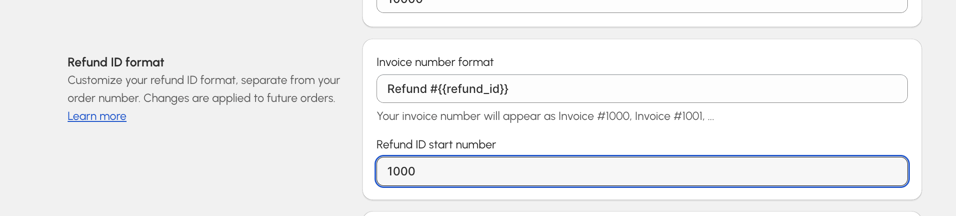
- Please remember to click Save to change all the modifications.
Noted that: Changes are applied to future orders.
You need to upgrade to Premium plan to use this advanced feature. Upgrade today to enjoy a 7-day free trial and receive 30% off for 3 months as part of our deal!
If you are in need of any advanced features, feel free to let us know. We will do our best to assist you with the most appropriate spending.
We value your feedback — it helps us continuously improve app and provide you with a better experience.
👉 Chat with us: Share your feedback directly with our team.
👉 Explore more apps: Discover more Fordeer apps. special deals.
🕐 Working hours: 8:30 AM – 5:00 PM (UTC+7), Monday–Friday.
We typically reply to live chats within minutes and emails within a few hours.
Need help? Feel free to reach out anytime via live chat or email!